Implementations of the table data structure
Collision likelihoods and load factors for hash tables
A simple Hash Table in operation
Imagine you have a big box, which represents your hash table, and inside this box, you have several smaller buckets. Each bucket is like a container, and each container has a label on it. Now, suppose you want to store some items, but you don't want to put them randomly in the box. Instead, you want to organize them in a way that makes it easy to find them later.
So, you decide to label each bucket with a number from 0 to N-1, where N is the total number of buckets you have. Let's say you have 10 buckets, labeled from 0 to 9. Now, if you have an item that you want to store, you look at its label (let's call it a key). If the key is, say, 5, you simply put the item inside the bucket labeled 5.
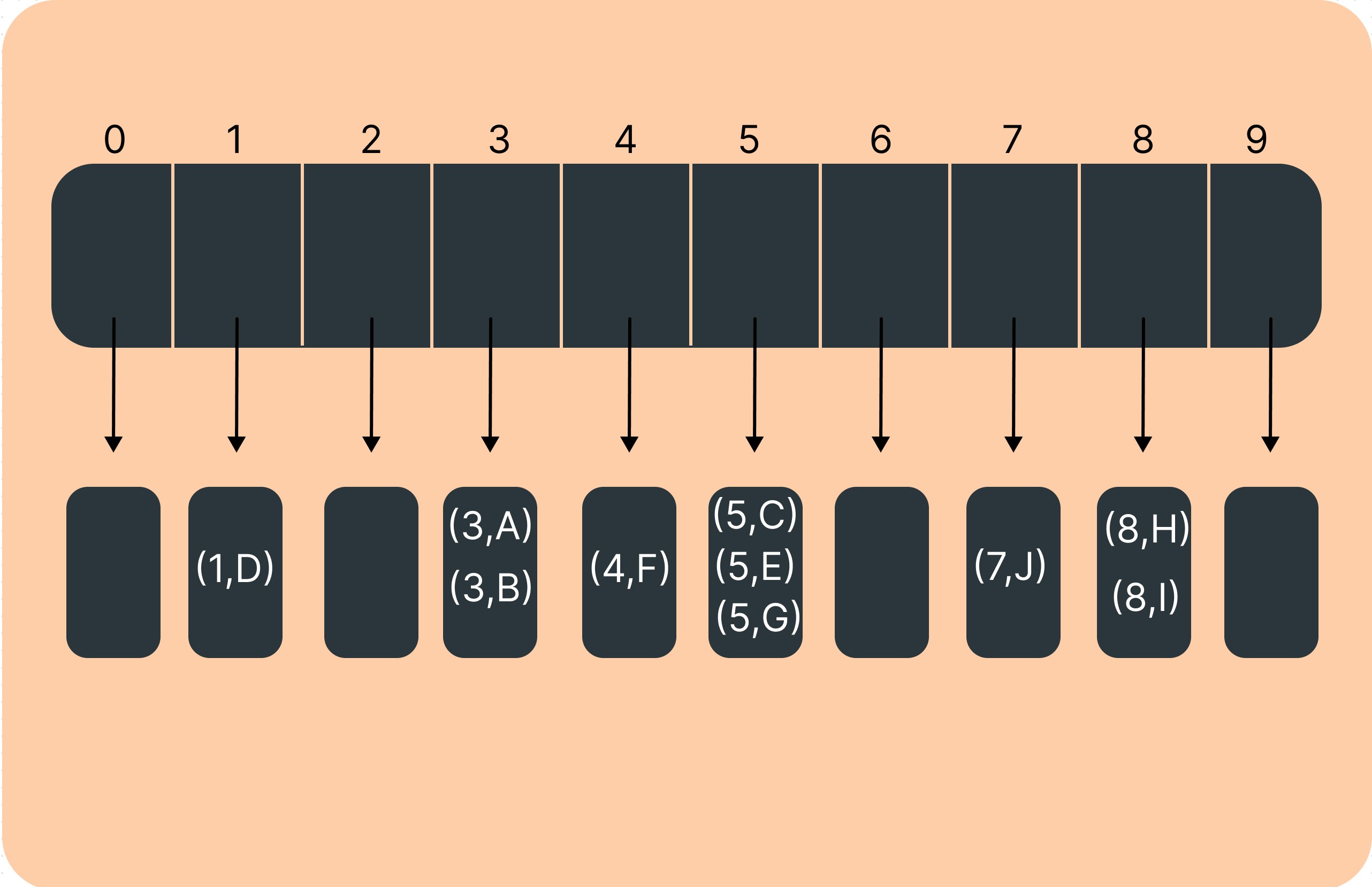
Here's an example: Imagine you have a bucket array with 10 buckets labeled from 0 to 9. You want to store some fruits based on their names. You decide to use the first letter of each fruit's name as its key.
Banana → Key: D → Bucket 1
Orange → Key: O → Bucket 4
Grape → Key: C, E, G → Bucket 5
Watermelon → Key: J → Bucket 7
Guaua → Key: H, I → Bucket 8
(Note: Collided with Orange, so you can handle it by chaining or another collision resolution method)
When you want to find a fruit, let's say "Orange," you know its key is 'O,' so you immediately go to Bucket 6 and find it there.
Now, let's address the drawbacks:
1. Wastage of Space: If you have many buckets but only a few items to store, you might end up with many empty buckets, which is like wasting space in your box. For example, if you have 100 buckets but only 10 items, you're using a lot of space unnecessarily.
2. Limited Key Range: You're limited to using keys that fit within the range 0 to N-1. This means if you have keys outside of this range, you can't directly use them as labels for your buckets. For instance, if you have a fruit with the key 'Z,' you can't store it directly in a bucket if your buckets are labeled from 0 to 9.
To overcome these drawbacks, you can use a mapping function that transforms your keys into integers within the range 0 to N-1. This allows you to use keys of any type and helps minimize wasted space by distributing items more evenly across the buckets.
Bucket Array
A data structure consisting of an array, where each element serves as a bucket capable of holding multiple key-value pairs. The size of the array is predetermined, typically denoted by N, defining the capacity of the bucket array. When inserting an entry with a specific key into the bucket array, it is placed into the bucket corresponding to the key's value modulo N. This structure is efficient when keys are integers distributed within the range [0, N-1].